

How credits work
One credit covers one recipient. An email to 200 attendees uses 200 credits, regardless of how long the message is. New accounts start with 10,000 signup credits. Because the cost is per recipient, not per email, the arithmetic is simple. A 300-person event with a launch announcement, a week-before reminder, and a day-before logistics email uses 3 × 300 = 900 credits. Run four such events a year and you’ve spent 3,600 credits — the signup allowance covers well over two years of that. A 2,500-person audience is a different story: each send costs 2,500 credits, so the same three-email sequence uses 7,500, and the free balance lasts one event.Your credits never expire. An unused balance carries forward indefinitely — there’s no monthly reset to spend against.
Check your balance
The credits panel sits at the top right of the Communication page and shows:- Your current balance as a large figure.
- How many remain of your signup credits — for example 9,998 left of 10,000 signup credits.
- How many you’ve used.
- A progress bar with the percentage remaining.
Top up## The top-up plans
Top-up Credits opens Top Up Your Credits — Choose the perfect plan for
your communication needs.
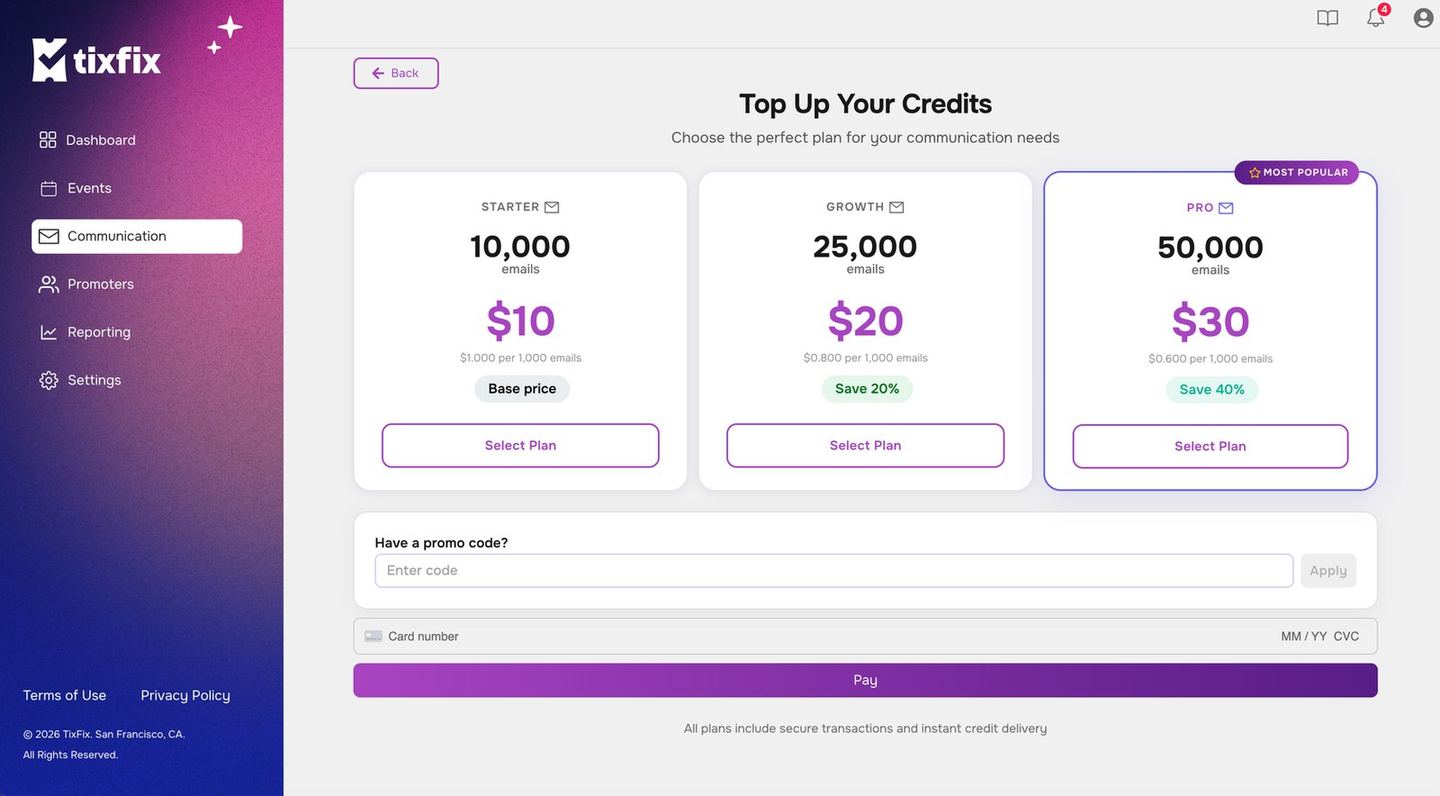
The three credit plans, with the effective per-thousand rate on each
The per-thousand rate falls as the bundle grows, so the larger plans are cheaper
per email. Since credits never expire, buying ahead is not a risk the way a
monthly allowance would be — unused credits simply carry forward.
There is a promo code field on the page, and payment is by card. The footer notes
that all plans include secure transactions and instant credit delivery.
Top up
ClickTop-up Credits in the credits panel to add more.
The right time to top up is when you plan a campaign, not when you compose it. Before an event goes on sale, count the emails you intend to send and the size of each audience, and make sure the balance covers the whole sequence.
Making credits go further
- Target properly. Sending to one ticket category rather than the whole event costs less and reads better. VIP arrival instructions to 30 VIP holders costs 30 credits; the same message to all 300 attendees costs 300 and confuses 270 of them. See Recipients and variables.
- Send fewer, better emails. Two considered emails beat six ignored ones, and cost a third as much.
- Check History before sending. The History panel shows recent sends — worth a glance to avoid duplicating a message someone else on your team already sent. A duplicate send to 2,000 people wastes 2,000 credits and, worse, trains your audience to skim you.
- Batch announcements. If the date reminder and the parking information are both ready, one email carrying both costs half as much as two.
What doesn’t use credits
Transactional email — the ticket that goes out when someone registers, and resent tickets — is part of running the event. Credits are for the announcements you choose to send from the Communication centre. That split matters when you’re budgeting: attendee volume alone doesn’t consume credits. An event can sell a thousand tickets and spend nothing until you decide to write to those people. When you do, the compose flow is covered in Email your attendees.Still stuck? Email contact@tixfix.ai with your event name and a screenshot.