

The lifecycle
1
You invite a promoter to a specific event
Name, email, and the event. See Assign a promoter.
2
You set the deal
How much they earn per sale, and how many tickets they’re allowed to sell. See Commission and allocation.
3
They accept by email
TixFix emails the invite — We’ll send them an invite to accept this deal on TixFix.
4
They sell
Sales attributed to them count against their allocation and accrue commission.
5
You track and pay
Watch the roster during the campaign, settle commission afterwards. See Track promoter performance and Promoter payouts.
The Promoters dashboard
OpenPromoters from the left sidebar. Two tabs sit at the top — Overview and Payouts — and a Showing for: filter lets you narrow everything to a single event or leave it on All events.
The three summary cards
Gross revenue here is before TixFix and Stripe fees, so it will not match the Net Sales figure on your dashboard. See Service and processing fees.
The promoter roster
Below the cards, the Promoter Roster table lists everyone working your events: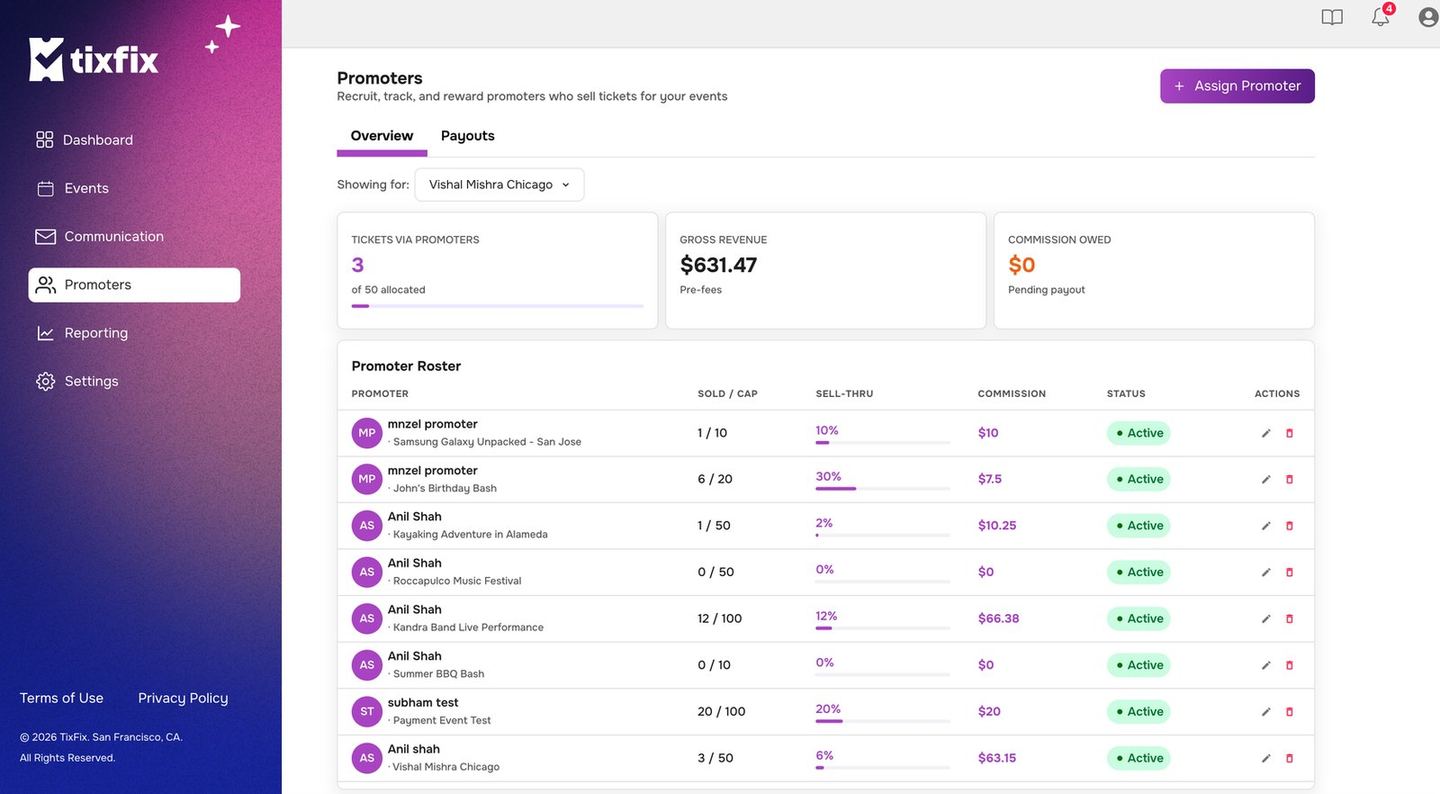
The Promoters dashboard, with the three summary cards and the roster below