

Personal information
Three fields are built in and always present:
Name and email cannot be switched off — the email address is where the ticket is
delivered. Phone has a toggle beside it, so you decide whether to require it. If an attendee mistypes it, you can resend to a corrected address later — see Resend a ticket.
Custom questions
Custom questions are grouped under Additional Information and are scoped to the ticket categories you choose. A question applied toVIP only is asked only of VIP buyers.
1
Open the Registration Information block
It sits below the ticket category table on the Almost There! step.
2
Click Add Custom Form
A new question opens for editing.
3
Choose which ticket categories it applies to
The
Applied to: control scopes the question. Pick one or more of your ticket categories.4
Write the question
Phrase it as the attendee will read it, for example
What food type would you want?5
Choose the field type and options
For a dropdown, list the options the attendee can pick from — for example
Chicken, Veg, Fish.6
Mark it required if you need an answer
A required question blocks checkout until it is answered.
7
Turn on Shown when scanning if door staff need the answer
See the section below for what this does.
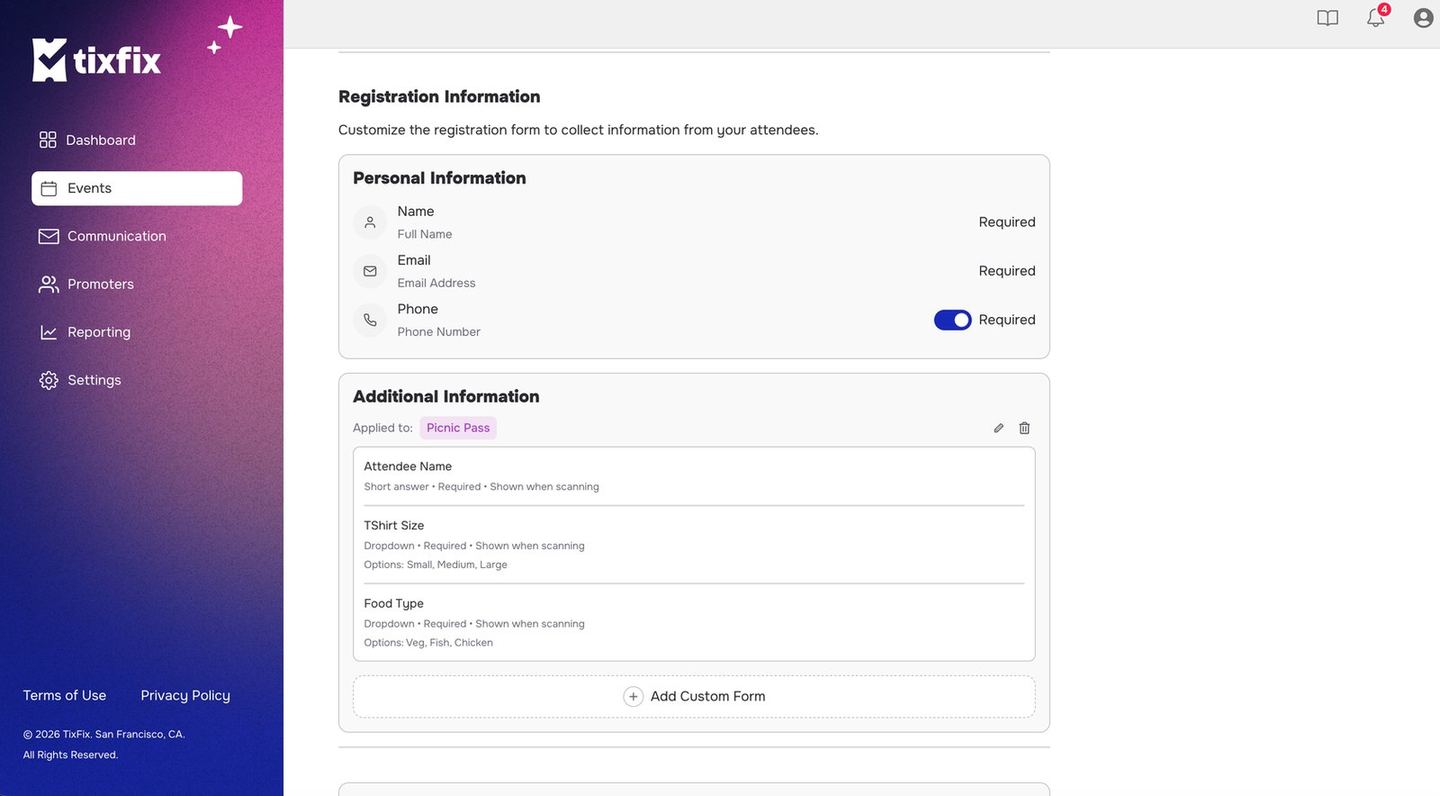
Registration Information: the three built-in fields, and custom questions scoped to a ticket category
Shown when scanning
A custom question marked shown when scanning surfaces the attendee’s answer to your door staff at the moment they check that person in. This is what makes meal choices and similar logistics work in practice: the person on the door scans a ticket and immediately seesVeg without looking anything up.
See Questions at check-in for what your scanners see.